Customer story · Property & real estate

Sơn Kim Land: from launch events to resident service

Twin supported three distinct changes for Sơn Kim Land: live unit matching at launches, availability and agreements in RIO Leasing CRM, and resident requests that could be tracked through the Highgate app.
Live launchesLeasing CRMHighgate resident service
Highgate screens showing a resident work request, progress and completed work
In the Highgate app, a resident could raise a request, follow progress and see the work recorded at completion.
Client
Sơn Kim Land
Industry
Property & real estate
Work
Event allocation software; RIO Solutions · Twin Real Estate
Users
Launch teams, leasing staff, property managers and residents

About Sơn Kim Land

A developer of substantial residential and mixed-use projects

Sơn Kim Land is a Vietnamese property developer whose portfolio includes The Metropole Thu Thiem and The 9 Stellars. The company describes these as 7.6-hectare and 16.5-hectare developments respectively, giving a concrete sense of the property environments behind its resident and operational services.

At the 2024 PropertyGuru Vietnam Property Awards, Sơn Kim Land was among the developers recognised as a Developer of the Decade. Twin’s documented work also includes software for sales events. RIO Solutions, Twin’s property software suite, covers the leasing, property operations and resident-service scope described later in this story.

7.6 haThe Metropole Thu Thiem, as described in Sơn Kim Land’s official portfolio.The Metropole Thu Thiem
16.5 haThe 9 Stellars township, described in the company’s November 2024 account.The 9 Stellars
2024Among the recipients of Developer of the Decade at the PropertyGuru Vietnam Property Awards.Award organiser’s archive

Portfolio areas and recognition provide client context. Sources checked 26 October 2026.

The project

Three changes across launch, leasing and occupation

Launch teams needed availability as buyers selected units. Leasing teams needed the unit record alongside enquiries and agreements. Once occupied, a property needed a shared route for resident requests and the staff completing them. The programme addressed each workflow separately.

During leasing

Availability and agreements

Keep unit enquiries, reservations, lease terms and expiry prompts together.

Explore RIO Leasing CRM
After move-in

Resident service

Let residents raise and track a request while the property team coordinates its completion.

Follow the Highgate request
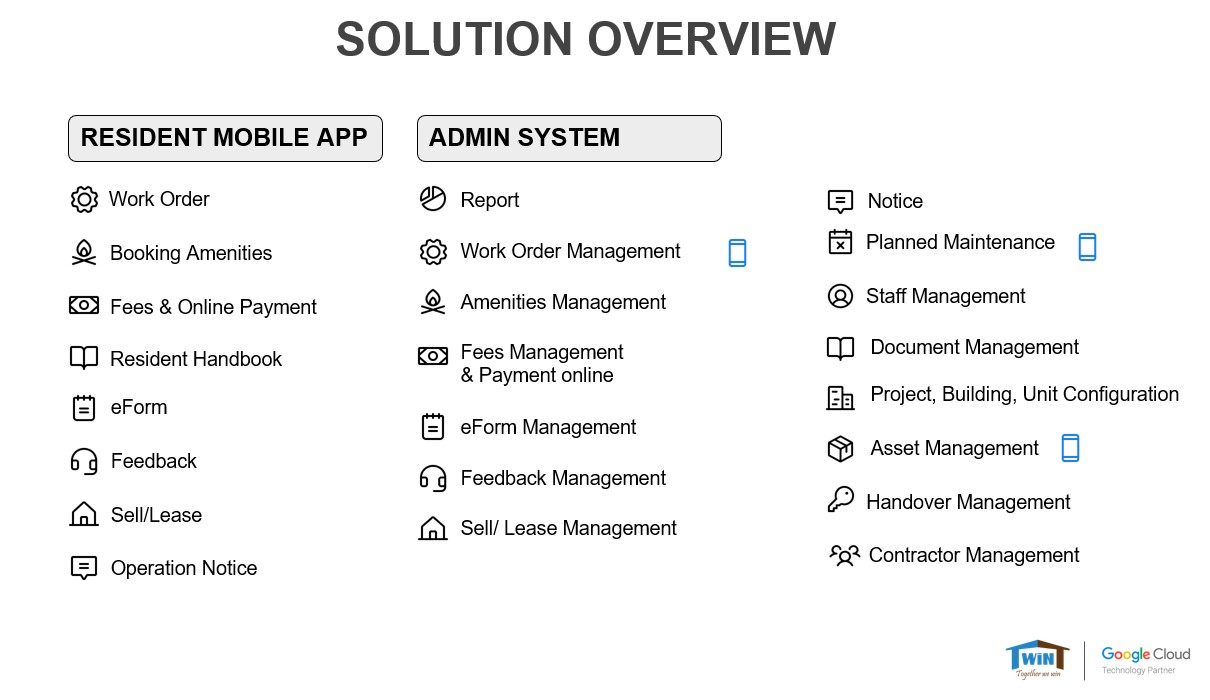
Solution overview listing eight resident app functions and the administration modules for property operations.
The solution overviewThe resident app and administration modules, from work orders and online payments to assets, maintenance and handovers.

Resident mobile services

Work orders, amenity bookings, fees and online payments, the resident handbook, eForms, feedback, property sale or lease requests, and building notices.

Administration and operations

  • Reporting, work orders, amenities, fees and online payments.
  • eForms, feedback, sales and leasing requests, and notices.
  • Planned maintenance, staff, documents, assets and contractors.
  • Project, building and unit configuration, plus handover management.

Resident experience

Everyday property services in the Highgate app

The home screen puts fees, facilities, work orders, sales and leasing, feedback, the handbook, messages and forms within reach. Fee reminders and message notifications sit alongside these services. The project selector shown in the app includes The Opera Residence, Serenity Sky Villas and The 9 Stellars.

Highgate is the property management business formerly known as Son Kim Office Company Limited. Its current resident application is Highgate Connect, published by Highgate Property Management Company Limited. The project screens shown here use the earlier Highgate Tenant branding; available functions are configured for each property.
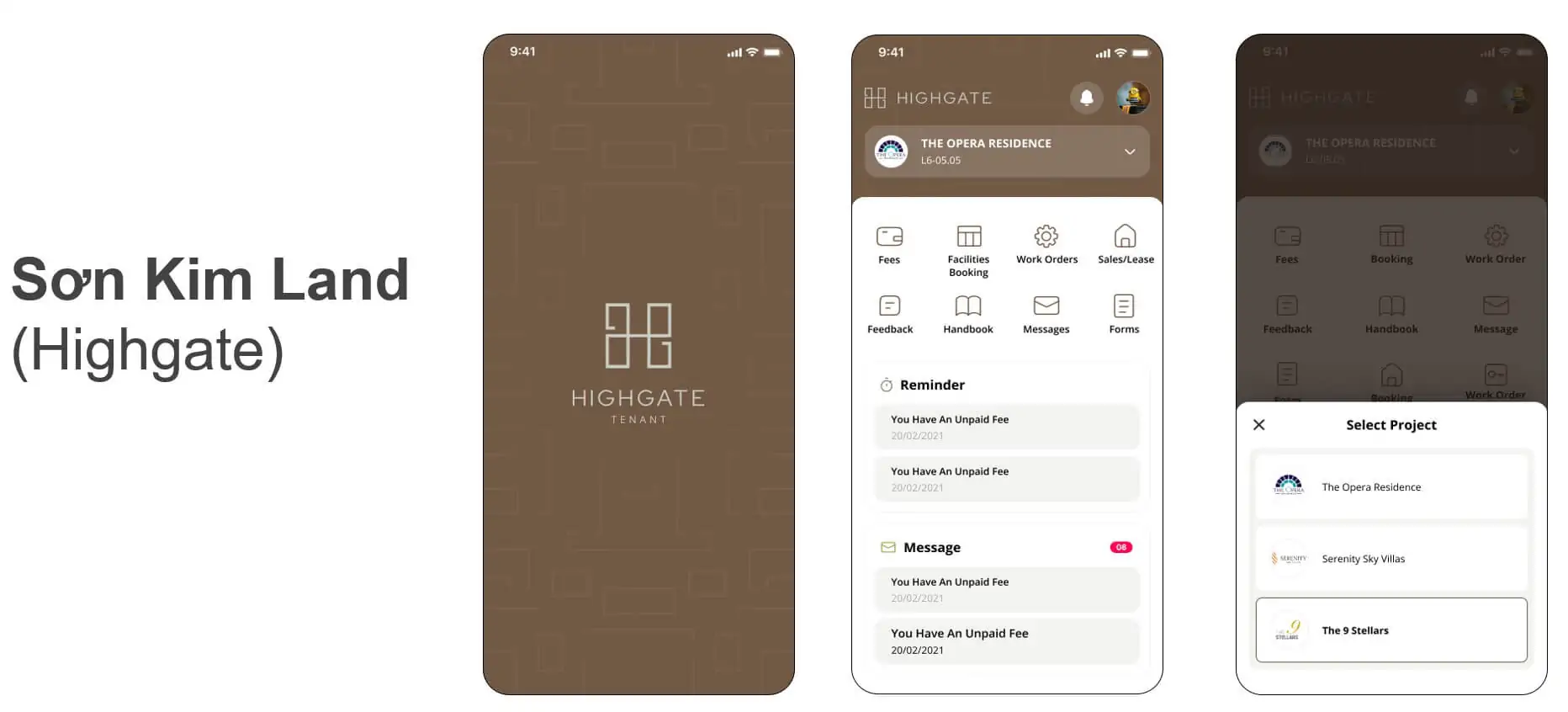
Highgate Tenant app launch screen, home dashboard with service icons and reminders, and a selector for The Opera Residence, Serenity Sky Villas and The 9 Stellars.
Highgate resident appThe Highgate Tenant launch screen, service dashboard and project selector.
Work orders

Follow a service request through to resolution

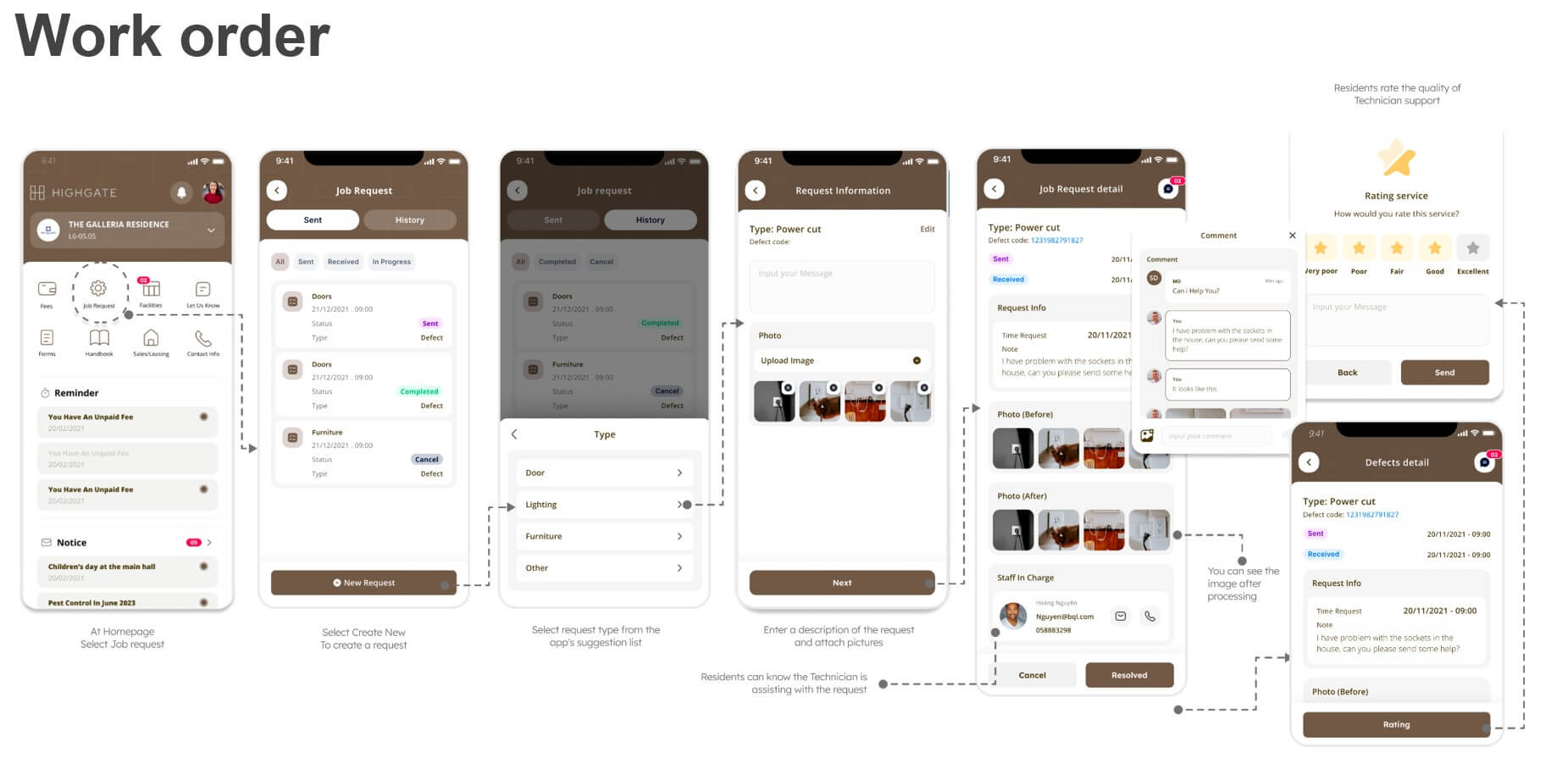
A resident can describe an issue, attach photos and send it to the management team. The request keeps its status, comments and assigned technician’s contact details together, so the resident can see who is handling it and what happens next.

Highgate work order screens showing request creation, issue type, description and photos, progress, technician contact, comments, completed work photos and a star rating.
Work order: from request to service ratingIssue selection, photo uploads, request status, technician details, comments, before-and-after images and resident feedback.
  1. Report the issueChoose a request type and add a description and photos.
  2. Track the workView progress, contact the technician and exchange comments.
  3. Review the resultCompare before-and-after photos, mark the issue resolved and rate the service.
Sales and leasing requests

Submit an apartment for sale or lease

Residents choose whether to sell or lease, then add contact details, a property description, price, floor area, bedroom and bathroom numbers, and photos. After submitting, they can check the request’s status, update the details or cancel with confirmation.
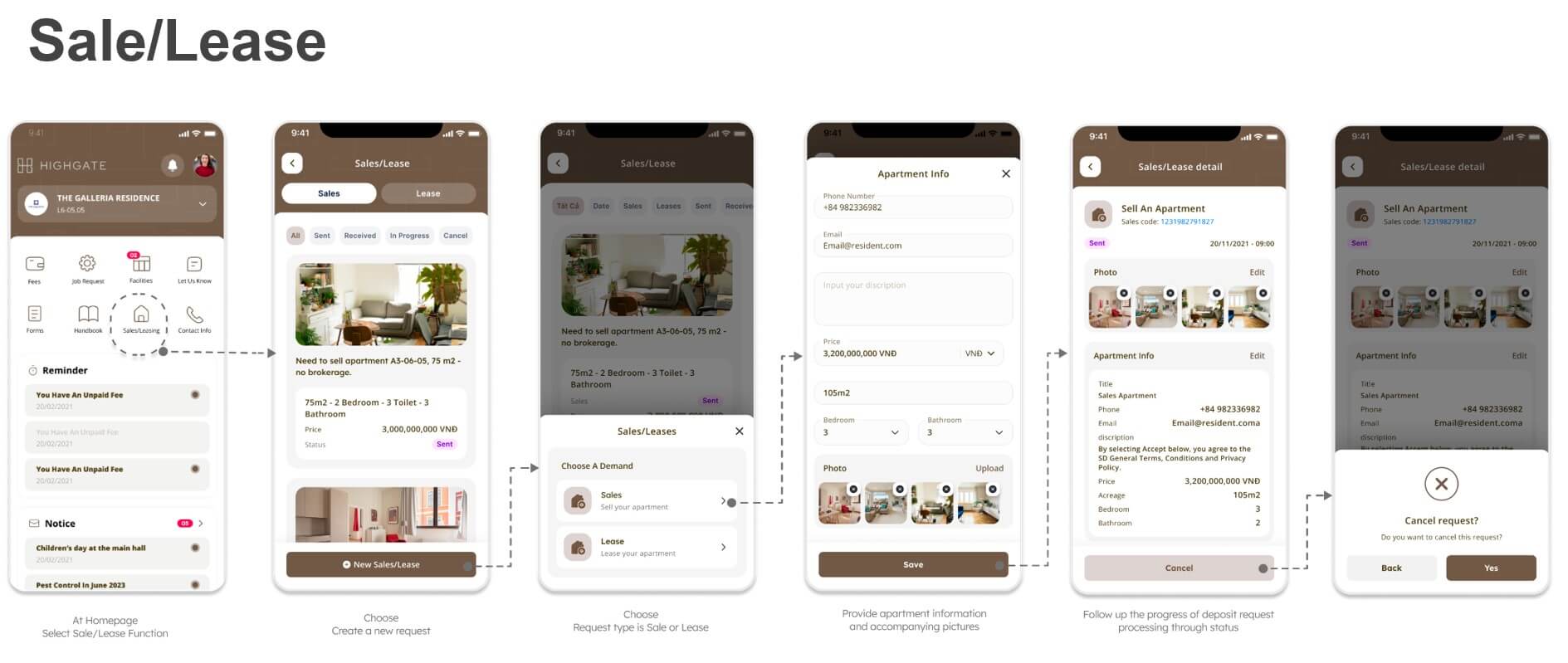
Highgate sale and lease screens showing request creation, apartment information and photos, status tracking and cancellation confirmation.
Sale or lease request in the resident appChoose the request type, add property details and photos, then track, edit or cancel the submission.
Apartment handover

Book the appointment and know who to contact

Residents select an apartment awaiting handover, choose a date and time, set a reminder and review the handover rules before confirming. The appointment record shows its status and the responsible staff member’s email and phone details. Waiting and completed handovers appear separately.
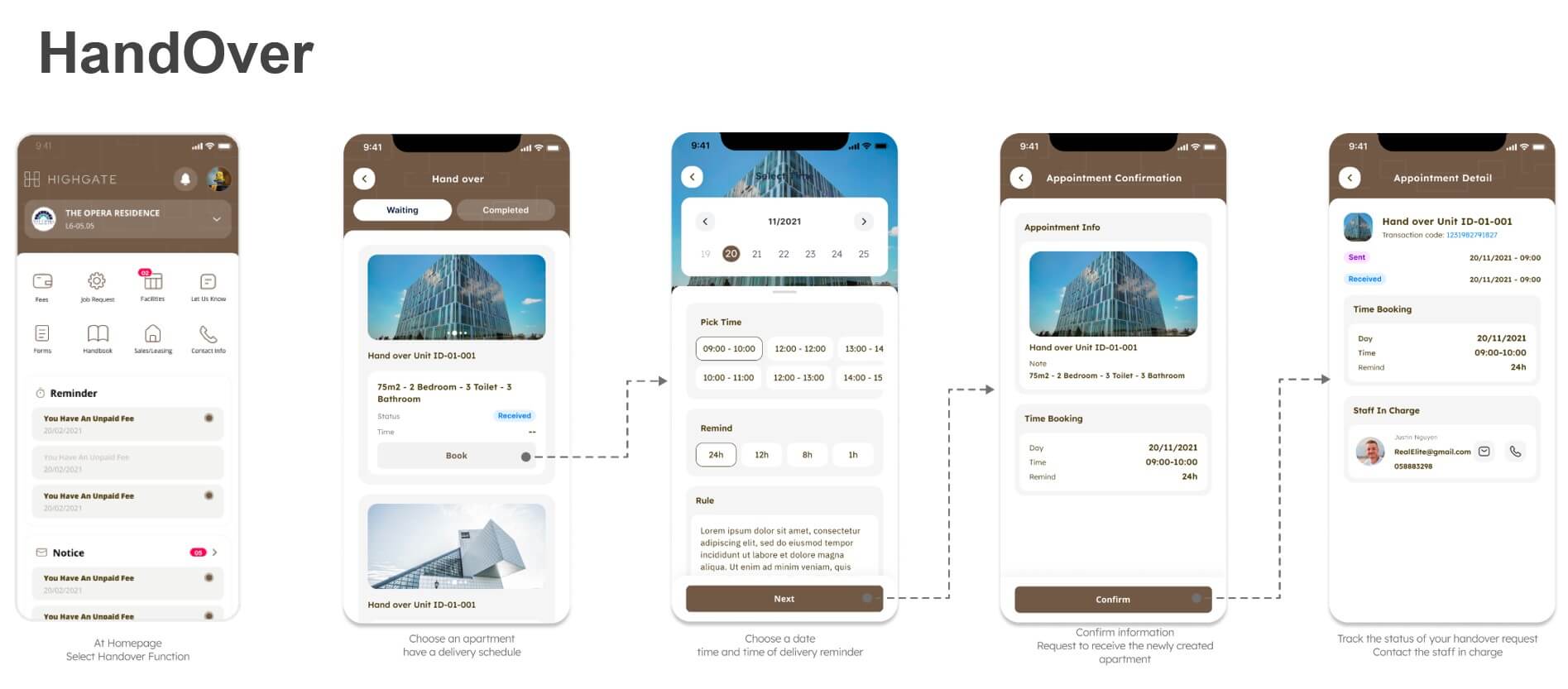
Highgate handover screens showing waiting and completed handovers, date and time selection, reminders, rules, appointment confirmation and responsible staff contact details.
Apartment handover bookingSelect a unit, choose an appointment, set a reminder and confirm, with staff contact details available in the booking.

Property operations

A working view for the management office

The Property Management System supports the people handling resident requests, building records and daily operations. Its overview dashboard brings resident, unit, staff and work-request information into a single view, with tables and charts that help managers see the activity behind each building.
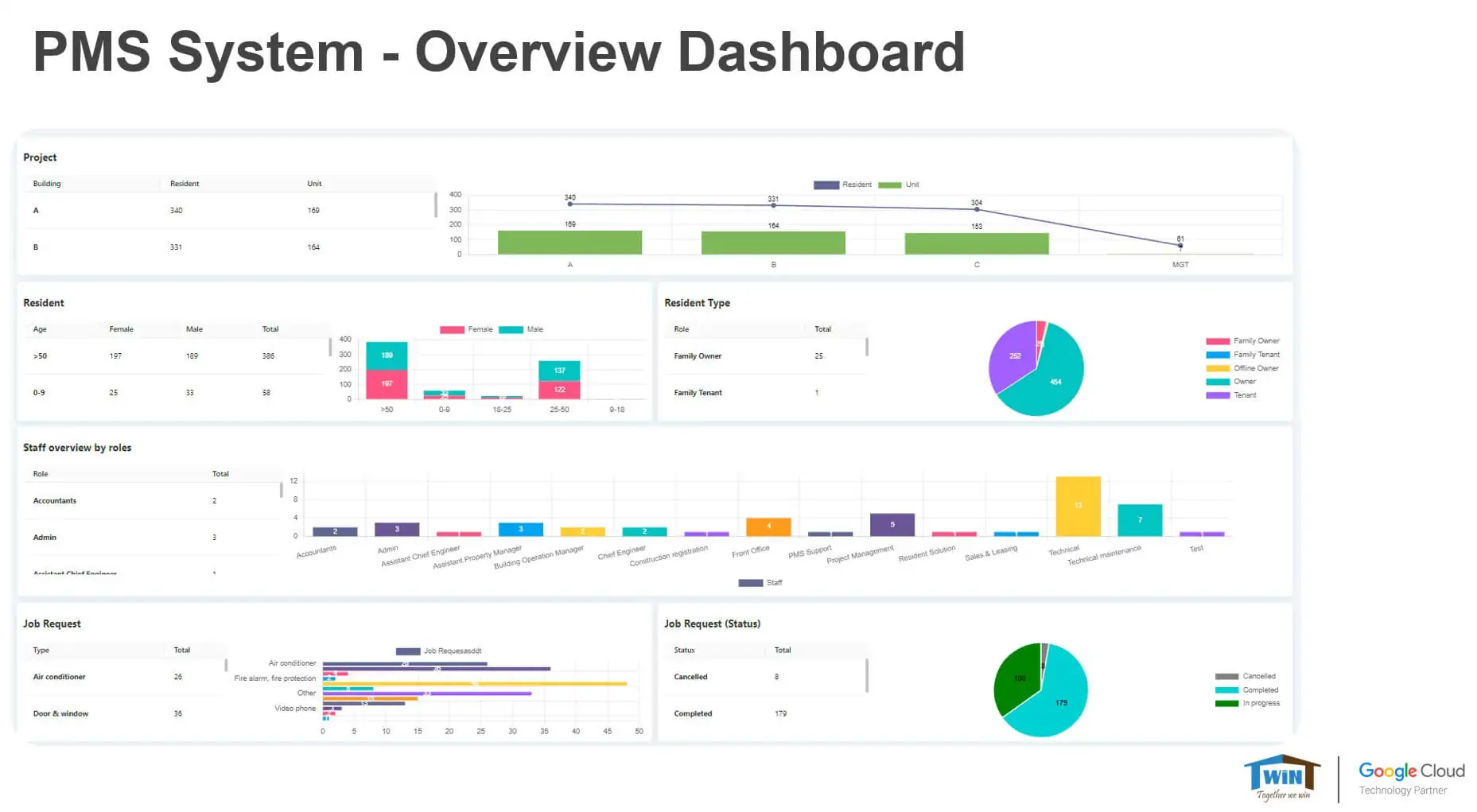
Property management dashboard showing residents and units by building, resident demographics and categories, staff by role, and work requests by category and status.
PMS overview dashboardBuilding, resident, staff and work-request information presented in tables and charts.
Residents and units
Residents and units by building, resident age and gender, and owner and tenant categories.
Staff and responsibilities
Staff numbers by role, including management, administration and technical teams.
Work-request progress
Requests by category and status, including completed, in-progress and cancelled work.

Rules that can be configured for each property

The RIO platform supports project-specific modules, rules and permissions. The presentation also sets out options for fees, amenity bookings, language support and system connections.

Amenities and fees

Booking approval rules, shared amenity spaces, deposits and refunds, automatic fee generation, payment reminders and PDF fee statements in the app.

Project access and resident services

Permissions at project level, login with a one-time password, multiple languages and reminders for upcoming amenity bookings.

Reporting and integration

Support for embedded Power BI dashboards and connections to other systems through APIs and software development kits.

Leasing and unit availability

Keep the unit record in view throughout the leasing process

The leasing stacking view connected available units with enquiries, agreements and documents. Staff could check the unit before making a proposal or reservation.

RIO Leasing CRM supported the steps around that record: client enquiries, matching, proposals, visits, reservations and agreements, with payment schedules and commissions.

Sales availability

See which units are sold, reserved or available

Sơn Kim Land’s sales stacking plan arranges units by floor and uses distinct statuses for sold, booked and available apartments. This gives staff a view of the unit’s sales status when handling a reservation. It is a separate view from the leasing and occupancy plan below.
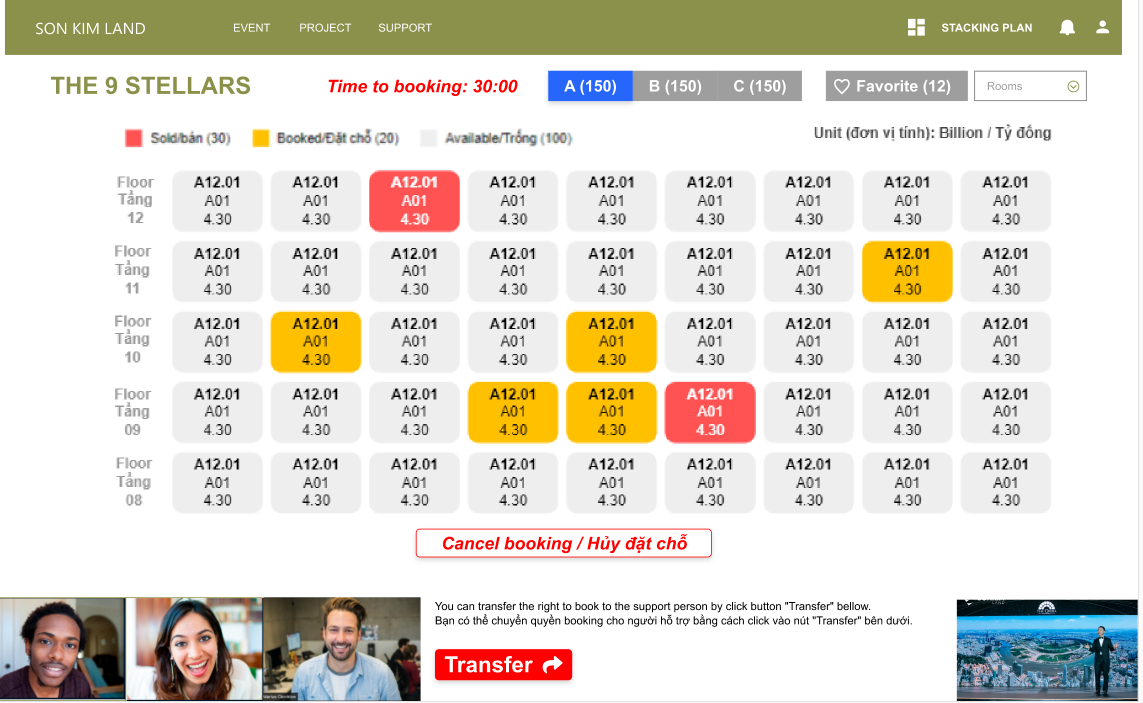
  • Sold
  • Booked / reserved
  • Available
The 9 Stellars sales stacking plan with units arranged by floor and sold, booked and available status labels.
Sơn Kim Land sales stacking planThe 9 Stellars unit grid, with sold, booked and available statuses distinguished by colour and labels.
Leasing unit management

Check availability, then open the unit’s full record

The leasing stacking plan groups apartments by floor and status, including vacant, leased, internal use, showroom and out of order. Filters narrow the view by project, unit type, status and date range; leased units show check-in and check-out dates.

Opening a unit reveals its area, balcony size, asking rent, direction and facilities, alongside related activities, enquiries, agreements, site visits, reservations, guests, status records and documents.
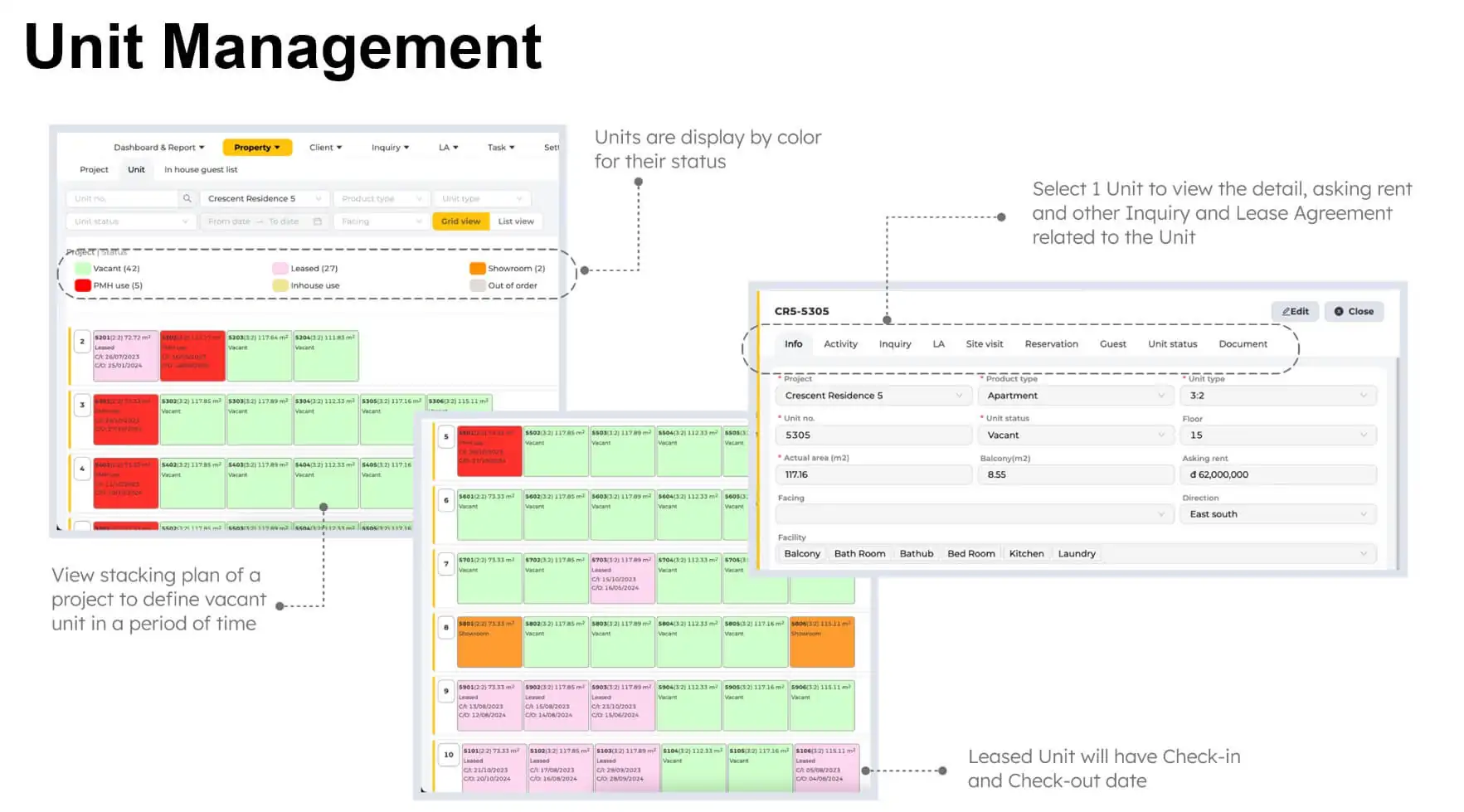
Leasing unit management screen showing a colour-coded floor plan, date and status filters, and a unit record with property details and tabs for related enquiries, agreements and documents.
RIO Leasing CRM: unit managementA leasing stacking plan and the selected unit’s details, with related records available from the same view. RIO module example from Twin’s PMS and Leasing CRM presentation.
Lease agreements

Keep contract details, payments and expiry dates together

The agreement record brings together the tenant and company, leased unit, contract dates, deposit, rent, fees, commissions and supporting documents. Staff can follow each payment period’s due date and status, alongside total rent, paid amounts and unbilled balances.
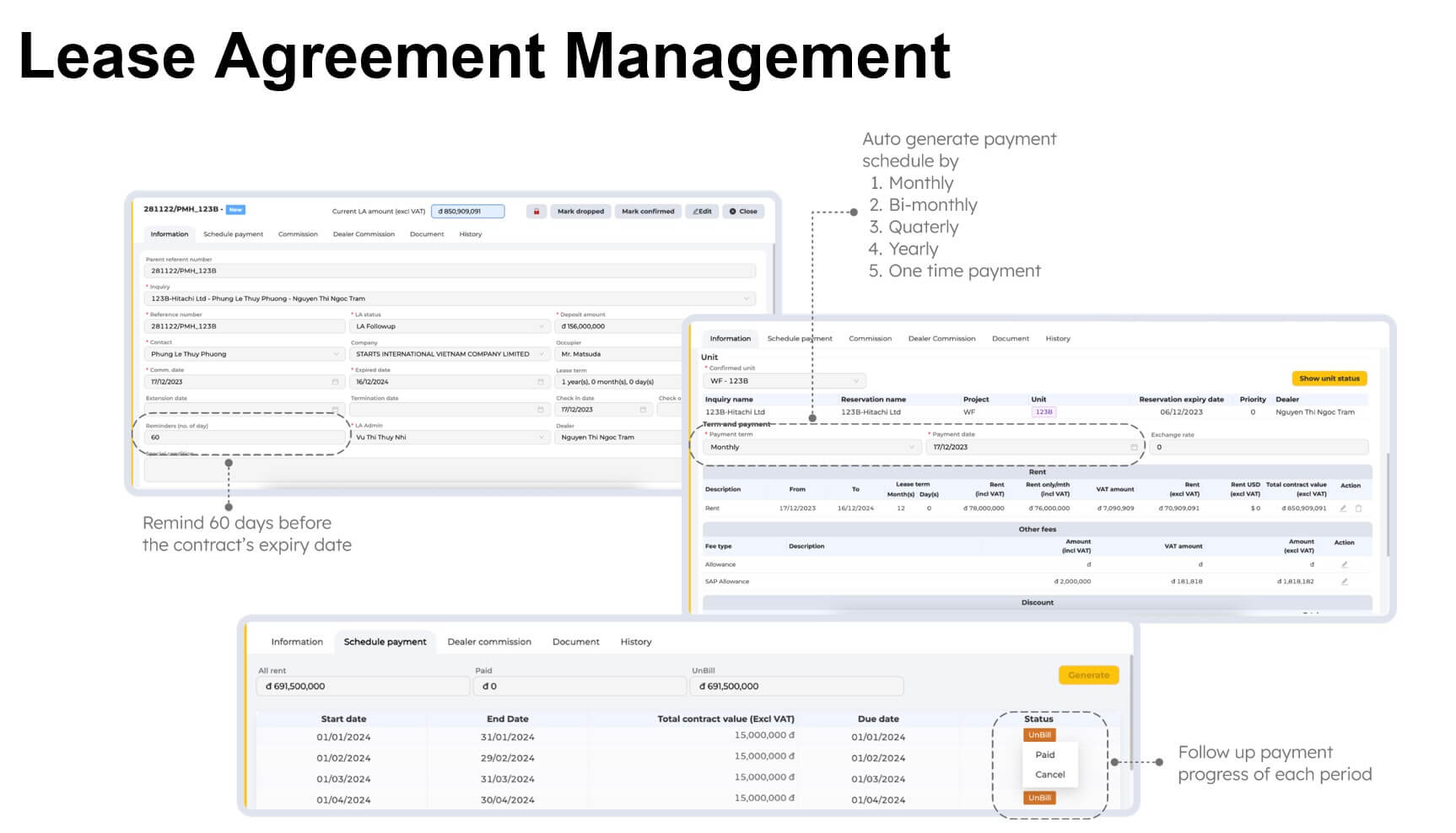
Lease agreement module showing tenant and company details, contract dates, rent and fees, a reminder set to 60 days before expiry, and payment schedules and statuses.
RIO Leasing CRM: lease agreement managementAgreement details, a 60-day expiry reminder and automatic schedules with payment status for each period. RIO module example from Twin’s PMS and Leasing CRM presentation.
Expiry reminders
The example shows a reminder set for 60 days before contract expiry, giving the team a prompt to follow up.
Automatic payment schedules
Schedules support monthly, bi-monthly, quarterly, annual and one-off payments, with the progress of each period visible.
Leasing reports

See new activity, upcoming expiries and agreement status

The reports compare new enquiries, reservations and lease agreements between periods, alongside cancelled deposits and rejected agreements. Charts show popular rental unit types, leases approaching expiry and agreement statuses, from draft and signed through to confirmed, terminated or dropped.
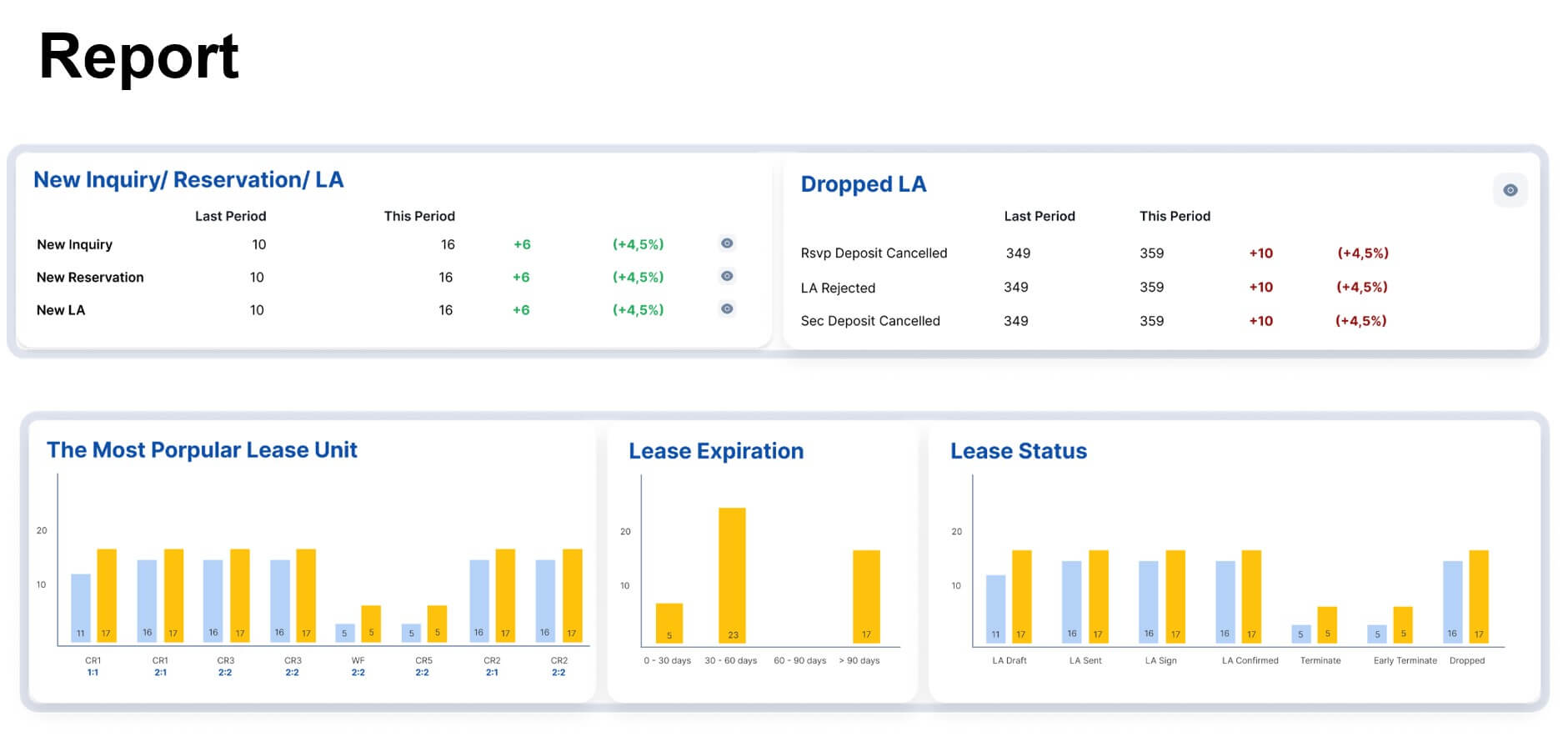
Leasing reports dashboard comparing enquiries, reservations, agreements and cancellations, with charts for unit types, leases approaching expiry and agreement statuses.
RIO Leasing CRM: leasing reportsPeriod comparisons, popular unit types, upcoming lease expiries and agreement status. RIO module example from Twin’s PMS and Leasing CRM presentation.

Highgate and Sơn Kim Land project screens are shown alongside RIO module examples from Twin’s 2024 PMS and Leasing CRM presentation.

Property sales and launch events

Allocation and unit matching during a launch

The Sơn Kim Land project presentation also documents a sales-event system supporting lottery-based stock allocation and real-time unit matching. The launch team needed to run the draw and work with availability as customers selected units. This is a separate event workflow from the RIO Leasing CRM and Highgate services shown above.

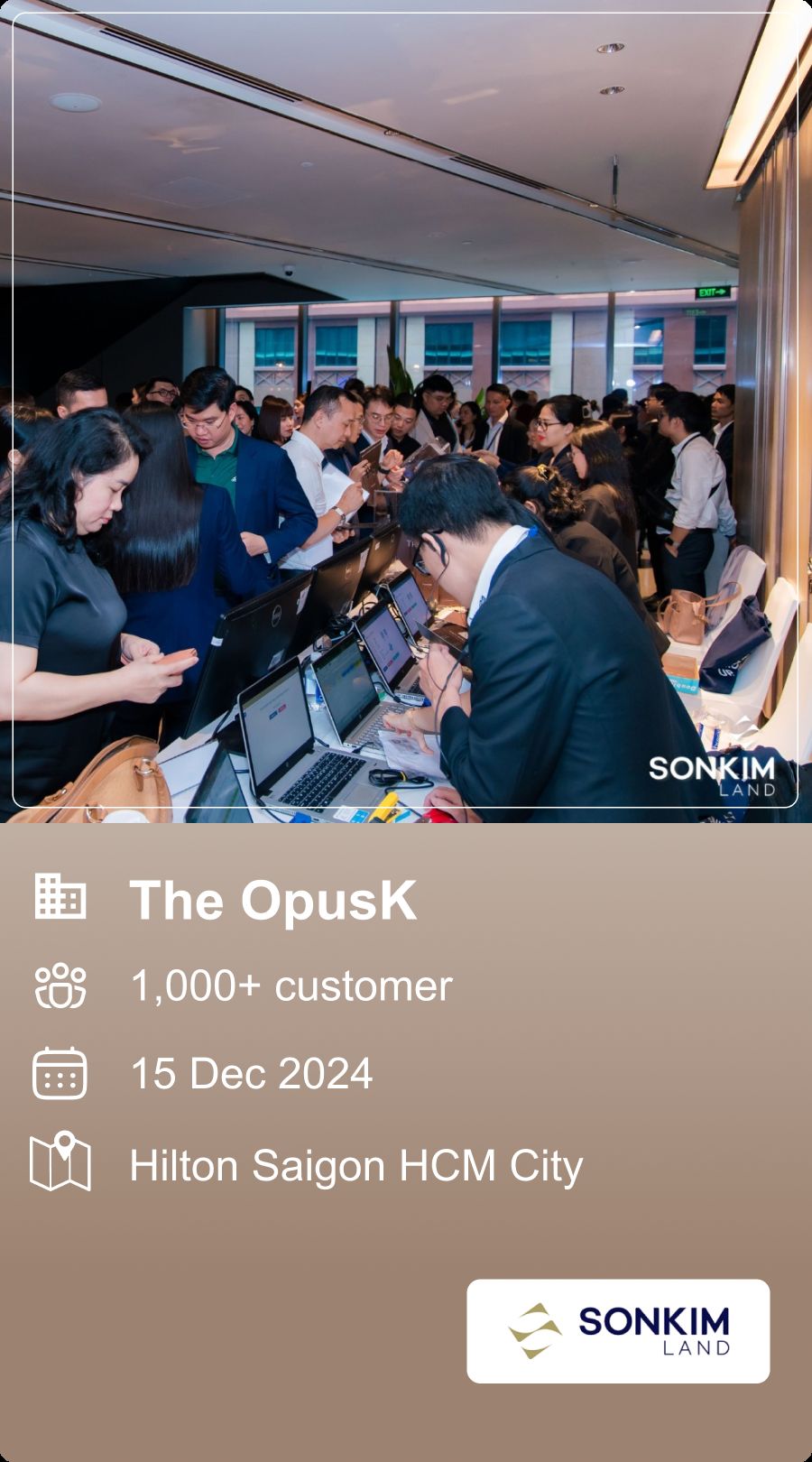
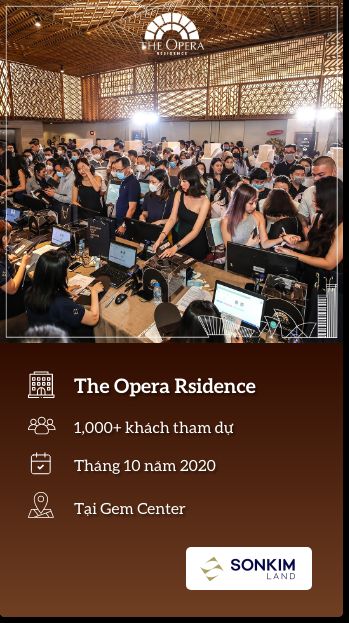
The team supplied three event examples: The Metropole Thu Thiem’s Galleria Residences premiere in December 2019, The Opera Residence in October 2020 and The OpusK in December 2024. Its event cards record more than 1,200 attendees for the first and more than 1,000 for The Opera Residence, showing the size of two launch settings.
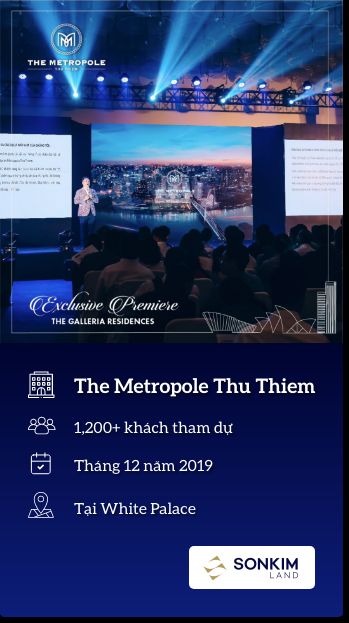
Sơn Kim Land’s Galleria Residences premiere event card showing a presentation stage and audience
The Metropole Thu Thiem, Galleria Residences premiere, December 2019.
The Opera Residence event card showing a busy registration desk and attendees
The Opera Residence event, October 2020.
The OpusK event card showing attendees and staff at registration
The OpusK event, December 2024.

Event cards and allocation description from Twin’s team presentation. The photographs show the event settings; the presentation documents the software workflow.

Project value

Working systems across launch, leasing and occupation

Launch staff could match buyers to units; leasing staff could work from availability and agreement records; management teams and residents could follow the same service request.

These were separate operating workflows for the same developer, with RIO leasing and property tools supporting the work around the resident app.

Discuss your property platform

What does your property team need to manage?

Tell us how you handle leasing, handover and resident service today. We can help define the property records, workflows, mobile services and system connections your teams need.

Project image

Open original image ↗